
Notifications
How to use this page
Section titled “How to use this page”Open Account → Notifications (Notifications). In the iPhone or Android app, open More → Notifications. Choose which alerts you want so TradeReview stays useful without noise.
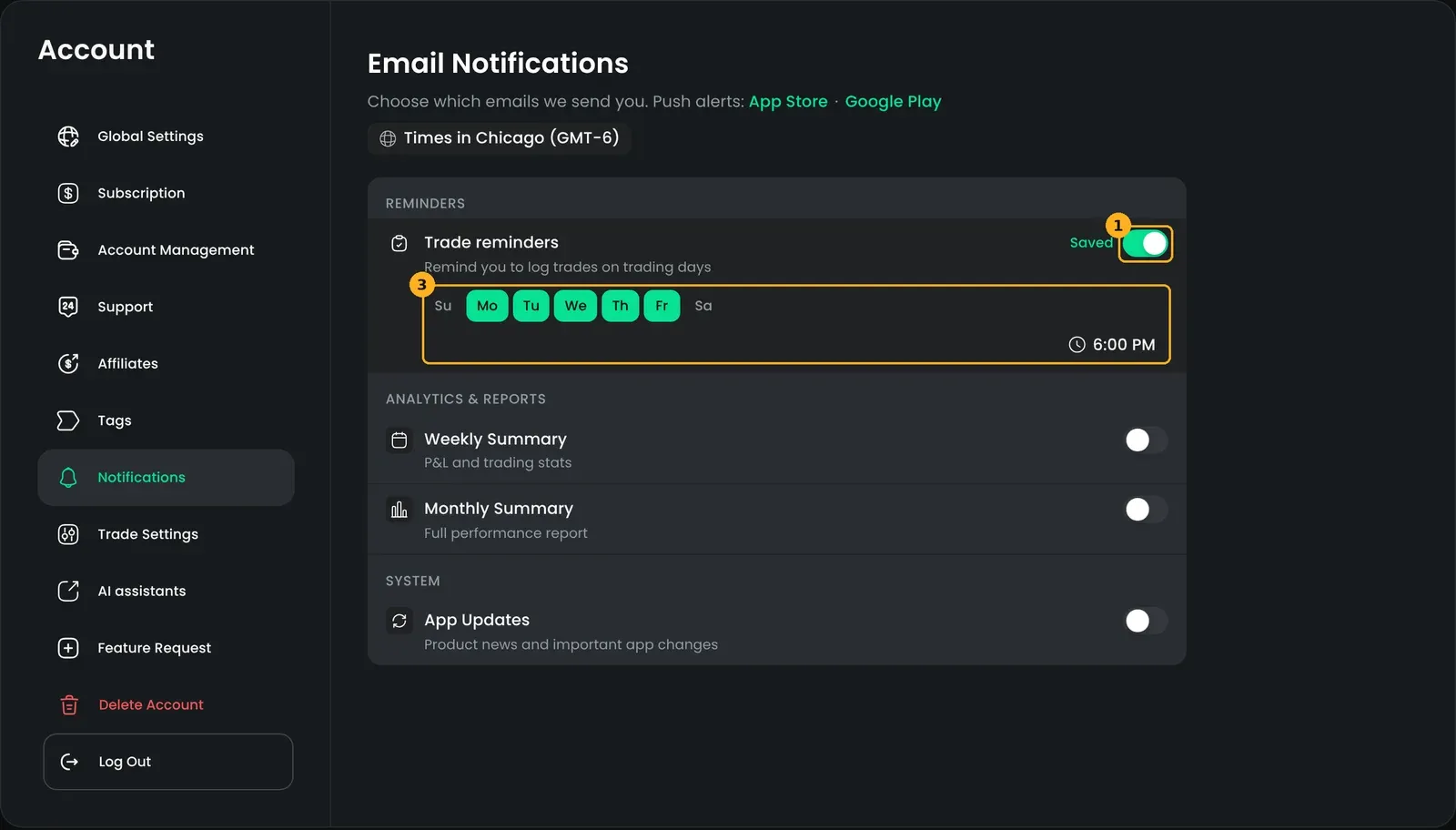
Trade reminders, summaries and app updates are off unless you turn them on here or during setup (setup suggests reminders and the weekly summary). Alerts about a broken broker connection are always on.
Categories
Section titled “Categories”- Reminders
- Trade reminders — remind you to log trades on trading days
- Analytics & Reports
- Weekly Summary — P&L and trading stats, on Mondays
- Monthly Summary — full performance report, on the 1st of the month
- System
- App Updates — product news and important app changes
Turn a notification on
Section titled “Turn a notification on”Step 1: Turn on the switch next to the notification.
Step 2: In the app, choose Push, Email, or both. On the web you set email only.
Step 3: Set when you get it:
- Weekly Summary and Monthly Summary — pick the time
- Trade reminders — pick the days and the time. At least one day stays selected.
Changes save automatically. You see Saved next to the notification.
Push and email
Section titled “Push and email”On the web, this page shows Email Notifications, with links to the App Store and Google Play. See TradeReview mobile app.
If push is turned off for TradeReview in your phone’s settings, the page shows Push notifications are off. Tap Enable notifications, then allow notifications for TradeReview. Until then, the Push option shows a lock. Use Manage device permissions at the bottom of the page to open your phone’s notification settings.
Times and timezone
Section titled “Times and timezone”Notification times follow your timezone, shown at the top of the page. You can change it there. This also changes the timezone in your profile — see Global settings.
What you receive
Section titled “What you receive”- Weekly Summary covers the previous week. Monthly Summary covers the previous month. If you had no trades in that period, nothing is sent.
- Trade reminders go out on the days you picked, at your chosen time. If you have closed trades waiting for review, the reminder asks you to review them. Otherwise, if you have not logged a trade that day, it reminds you to log one. If neither applies, no reminder is sent.
- If a connected broker account stops syncing, TradeReview also lets you know, so you can fix it. This alert is not in the list on this page.
Notification inbox
Section titled “Notification inbox”Click the bell icon in the header to see your recent notifications, on the web and in the app.
- Click a notification to open the screen it is about. For example, a weekly summary opens Reports.
- When you have several unread notifications, click Mark all read to clear them.
- Click the gear icon to open this settings page.
- Keep reminders on during your first weeks if you are building a review habit — First week checklist
- Turn off categories you never act on; silence is better than ignored alerts