
Trades list and filters
How to use this page
Section titled “How to use this page”Open Trades in the side menu (Trades). Use the list to find trades quickly, then open one for a full review. Filters at the top apply across the journal so you can focus on a date range, account, symbol, or tag.
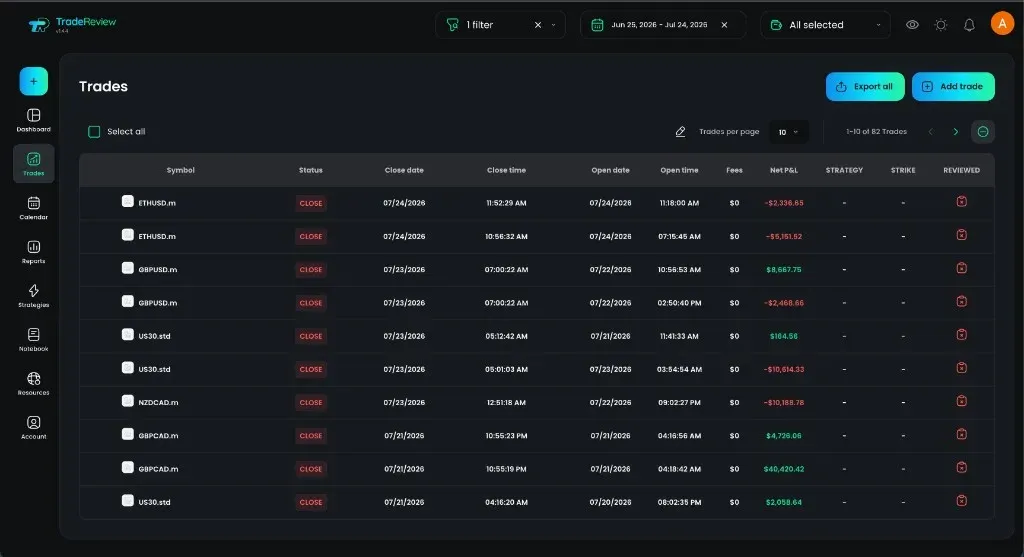
What you see
Section titled “What you see”- A table (or cards on mobile) of trades for the selected filters
- Columns such as symbol, status, dates, fees, P&L, strategy, and reviewed state
- Quick access into a single trade when you select a row
Filtering
Section titled “Filtering”At the top of the page you can:
- Set a date range for the period you want to review
- Open Filter for status (open/closed), instrument type, tags, side (long/short), symbol, and related criteria
- Narrow by trading account when you manage more than one
For a deeper walkthrough of each filter, see How to filter trades in TradeReview.
Opening a trade
Section titled “Opening a trade”Select any trade to open its detail view — chart, notes, executions, tags, and more.
Next: Viewing a trade